Inside the cellCell membranes, DNA & proteins
MADE FOR YOUR NEXT BREAKTHROUGH
Your notes, a plan, and a Pal to help you follow through. Ask a question, work through a tricky idea, or turn a deadline into your next step.
Mac preview 0.86.0 · Windows developer preview.
Made for your computer. Open this website on a Mac or Windows PC to download Study Pal.
Cloud notes are available in the beta. Pal AI is limited to approved testers.
 MY STUDY SPACESaved ✓
BIOLOGY / 04
A little light.
A lot of life.
Plants turn sunlight into something they can use.
Light energy is converted into chemical energy stored in glucose.

One idea at a time.
What does that actually mean?
Think of sunlight as the charger. The plant stores that energy in glucose, ready to use later.
Illustrated example · explore each step
STRAIGHT FROM STUDY PAL
A calmer place
to study.
A real workspace, with your notes and next steps together. Explore captures from the Mac beta using fictional study material.
01 · A space for your ideas
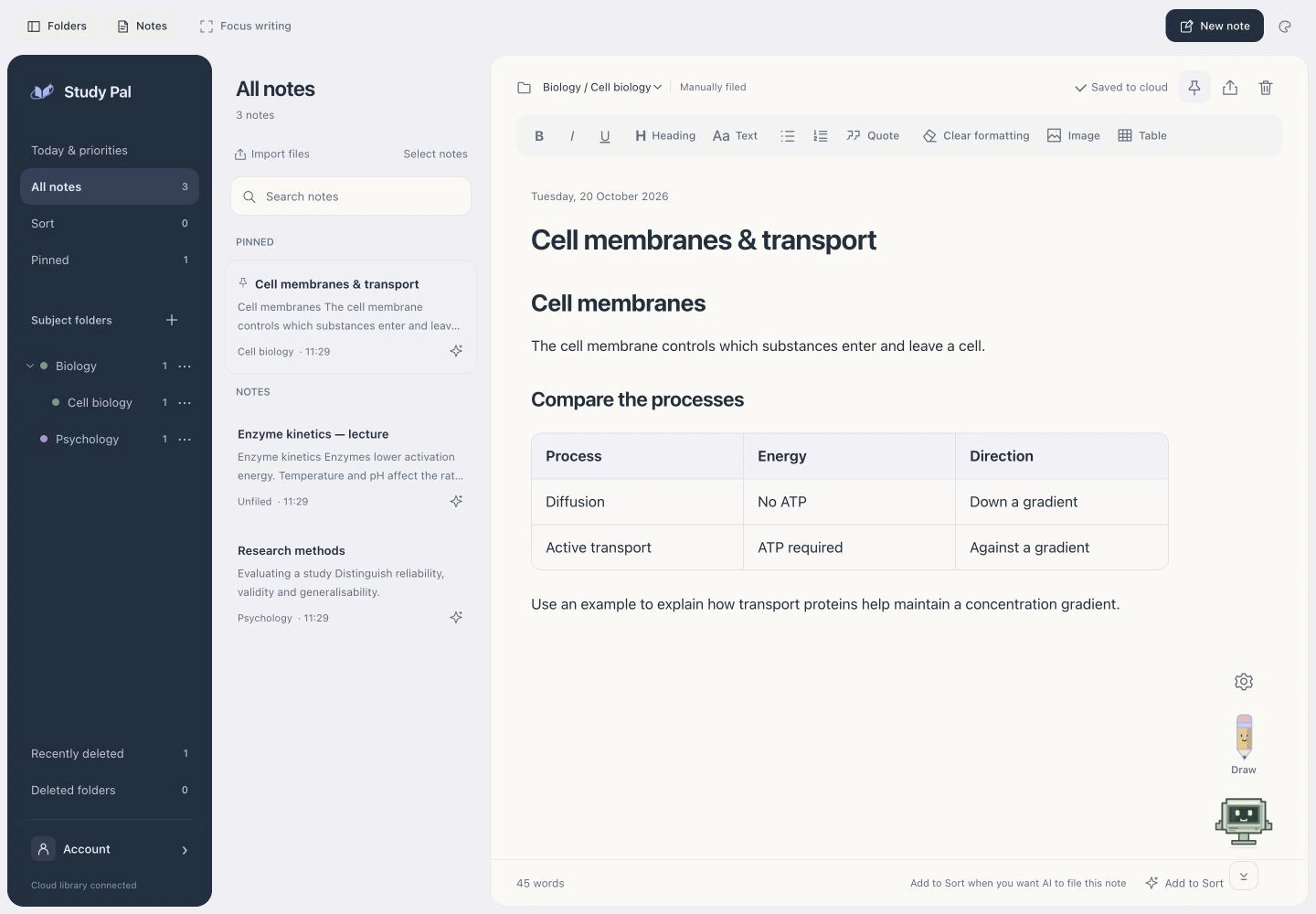
Captured from the Mac beta with fictional notes and example responses. No personal study data is shown.
FROM “I NEED TO…” TO “DONE.”
A little direction.
A lot more done.
Tell Pal what is on your mind. Ask for a plan and a deadline in one message, then review each proposed change.
Interactive illustration · sample data only.
Nothing is sent to AI or saved to your account.
PalOne conversation. Your study space.
PAL
Just ask Pal, in your own words.
TRY THE PEN
A question starts
with a circle.
Draw around the tricky part. It goes straight into your chat, where Pal asks what help you need.
01
Draw. Scan. Ask.
Your question stays with the note.
Interactive example · sample answers · no AI credits used.
SAMPLE STUDY NOTE
How plants catch the sun.
Photosynthesis begins with something simple: light.
Light energy is converted into chemical energy stored in glucose.
Draw here, or try a shape below. Escape resets.
Pal
Ready when you are.
Draw around the passage. Pal will ask what help you need.
Only the marked area can be edited.
Example only. Nothing is sent to AI.
NOTES, IN THEIR PLACE
A place for
every subject.
Choose which notes Pal can sort. It files clear matches by subject and leaves uncertain ones for your review.
✓ Only notes you choose✓ Respect your folders✓ Undo a move
Illustrated example. Your real notes aren’t accessed.
AI organisationEXAMPLE WORKSPACE
Sort 2
How we rememberWorking memory & recall
✓A little more room to think.
▱
Biology
0 notes▱
Psychology
0 notesMEET YOUR KIND OF COMPANY
Choose your kind
of company.
A little retro. A little personality.
Choose a study companion that feels like you.
Pebble PalEXAMPLE EXPLANATION
Why do we need a cell membrane?
Think of it as the cell’s friendly bouncer! It lets useful things in, keeps unwanted things out, and helps the cell stay in balance. Tiny gatekeeper, big job.
The actual retro designs from Study Pal. Choose a personality and animation style in the app.
A FRESH START, WITH YOUR OLD IDEAS
Bring your notes along.
Keep the work you’ve already put in. Import supported exports from Apple Notes, Notion and Evernote, review the transfer, and carry on studying.
Automatic Apple Notes transfer is available in the Mac app. Your originals stay where they are.START SIMPLE. GET A LITTLE EXTRA HELP.
Your notes are free.
Your Pal is optional.
YOUR EVERYDAY WORKSPACE
Study Pal
FreeAlways a place for your notes.
- Write and organise your notes
- Colours, fonts and focus writing
- Import supported note exports
- Open your notes on another computer
A LITTLE COMPANY FOR YOUR STUDIES ✦
Pal Plus
£34.99 / yearAbout £2.92 a month, billed yearly.
- Everything in Study Pal
- 500 Pal replies each month
- 300 AI note sorts each month
- Explanations and edits you approve
- Pal-led plans, priorities and focus
Pricing preview. Subscriptions aren’t on sale yet.
YOUR NEXT “AHA” STARTS HERE
Make your next study session
feel a little easier.
Your ideas deserve a place that helps them grow.
- Free notes
- Saved to your account
- No purchase to download
Mac 0.86.0 · Windows 0.79.1 developer preview. Read the requirements before downloading.
A FEW THINGS YOU MIGHT WONDER
Let’s clear that up.
Can I download Study Pal on my phone or tablet?+
Study Pal is a desktop app for Mac and Windows. You can explore the website and try its demos on your phone or tablet, then open this website on your computer to download the app.
Can I use Study Pal without AI?+
Yes. Your notes and folders do not use AI. Sign in to open your cloud library; cloud saving requires an internet connection. Pal chat and AI sorting are optional and currently limited to approved beta testers.
Does it work on Windows?+
The older Windows developer preview includes the notes editor and account-based cloud library. The latest Pal productivity features are currently in the Mac preview. The downloadable developer preview needs Python 3.12 and Edge WebView2. A standalone build script is included. Native Windows testing is still pending, so it isn’t labelled a finished Windows release.
Where are my notes saved?+
In your signed-in Study Pal account. Your notes, folders, images and Pal conversations open when you sign in on another computer. Signing out clears the open library from the app. Cloud saving needs an internet connection. Existing local notes require an approved transfer; their original recovery copy is kept.
Will Pal change my notes without asking?+
Text changes require your approval. Pal shows a draft for you to review first, and a marked area restricts edits to that part. AI sorting only starts after you enable it and add notes to Sort.
What can I ask Pal to do?+
Use everyday language: “open calendar”, “show my priorities”, “help me revise this”, or “pause my timer”. Pal can explain notes and prepare plans, dated tasks, exam entries and focus sessions. Review and approve proposed changes before they are saved. If a request is unclear, Pal asks for the missing details. AI can make mistakes.
Will Study Pal remind me about deadlines?+
Pal can prepare reminders for dated study work. Review their timing and enable them in the app. Mac desktop delivery needs notification permission; the website itself does not send study notifications. Windows desktop reminders are not included in the current developer preview.
Is this ready to download publicly?+
This is a live beta website with development previews. The Mac preview is version 0.86.0; the Windows source preview is version 0.79.1. A general customer launch still needs trusted, tested installers and dependable hosting beyond the trial. These preview downloads do not contain the developer’s personal notes or service keys.